vibeflow is an open-source Linux terminal that shows, per tab, whether the program inside is working or waiting on you. This article details how the detection works: the open protocol, the heuristic fallback, and other key components.
A regular terminal emulator renders a grid of characters coming out of a pty. It has no notion of what the program on the other end is doing, which was never a problem because a human was typing every command and already knew. The terminal is essentially modeled after a typewriter, and how often has anyone worked at two typewriters at once, much less five? AI coding agents break that assumption. They run for minutes (for periods getting longer all the time), then stop and wait for input, and from the terminal’s point of view “thinking hard” and “waiting for you” are the same thing: a quiet pty.
There are terminal emulators available that can help tackle this problem (personally, I use iTerm2 on my Macs), but I’ve been doing more work directly on my home Linux server, and couldn’t find one that worked the way I wanted. So, I built vibeflow to align with the way I want to work: to show, per tab, whether the program running inside is working or waiting. The design question is the interesting part: how do you make a terminal aware of program state without (a) hard-coding knowledge of specific tools, or (b) requiring every tool to cooperate before the feature does anything useful?
None of this is unprecedented. Shell-integration sequences — FinalTerm’s original OSC 133,
iTerm2’s extensions, the prompt markers many shells now emit — already taught terminals to
recognize where a prompt begins and a command ends. tmux can shell out to notify-send. What I
haven’t seen is a small, open protocol specifically for agent state, paired with a fallback
that works when the tool emits nothing at all, and that runs natively on Linux. That pairing is
vibeflow’s answer, and it has two layers.
Layer 1: an open protocol (OSC 1338)
The high-fidelity path is for the tool to just make an announcement. The cleanest channel for that is the one already connecting the tool to the terminal: the pty byte stream.
OSC (“Operating System Command”) escape sequences are the established way for a program to send out-of-band metadata to its terminal, such as setting the window title (OSC 0/2) or writing the clipboard (OSC 52). Terminals that don’t understand a given OSC ignore it. That property is exactly what you want for an opt-in feature: a tool can emit state unconditionally, and on any other terminal the bytes simply vanish. No capability negotiation, no breakage.
So vibeflow defines one:
ESC ] 1338 ; key=value [ ; key=value ]* ( BEL | ST )
The frame that matters most looks like this on the wire:
\x1b]1338;state=waiting;tool=claude;project=vibeflow\x07
The grammar is deliberately tiny:
state(required) is one ofactive,working,waiting,done.tool(optional) names the emitter (claude,codex) for display and grouping.project(optional) surfaces in the tab’s subtitle.
Values are percent-encoded with uppercase hex if they’d otherwise collide with the ; / =
delimiters, contain a literal %, or contain control or non-ASCII bytes, so a;b=c rides across
as a%3Bb%3Dc. Frames
are capped at 4 KiB; anything longer is dropped on the floor rather than parsed.
Why the number 1338? It’s unclaimed by the common sequences, and the protocol owns it: it means nothing to any other terminal, and the stability rule is simple. Additive changes (new keys, new state values) stay safe for old parsers, and a breaking change would bump the identifier itself. (And yes, it lands one past iTerm2’s OSC 1337. Make of that what you will.)
Emitting is meant to be a one-liner. The protocol ships as a Rust crate:
use vibeflow_protocol::{emit, Frame, State};

emit(&Frame::new(State::Waiting)
    .with_tool("claude")
    .with_project("vibeflow"))?;
…a CLI for shell scripts and hooks:
vibeflow-emit waiting --tool=claude
…and an npm package (vibeflow-protocol) for Node-based tools. The receiving end calls the same
parse() from the same crate, so emitter and consumer can’t drift apart.
The /dev/tty detour
Here’s the first thing that didn’t work the obvious way. To make Claude Code emit these, you hang
vibeflow-emit off its hooks. The natural implementation writes the escape sequence to stdout,
which is where terminal output goes.
Except Claude Code runs hook commands with their stdout captured; it uses hook output for its own
purposes. So the bytes I wrote to stdout never reached the pty, and the tab never lit up. The fix
is to write directly to the controlling terminal: vibeflow-emit opens /dev/tty and writes the
sequence there, which lands on the real pty regardless of how stdout is redirected. (There’s an env
override, VIBEFLOW_EMIT_STDOUT=1, for the pipe-it-yourself case.) Small thing, but it’s the
difference between the feature working and silently doing nothing.
Why five hooks
The other surprise was hook coverage. You’d think two hooks would do it, one for “started,” one for “stopped.” In practice the Claude Code wiring needs five:
UserPromptSubmit  → working
PreToolUse        → working
PostToolUse       → working
Stop              → waiting
Notification      → waiting
The reason is that Claude Code fires Stop at the end of every response, including the brief
pauses between tool-call rounds inside a single turn. Wire up only Stop / UserPromptSubmit and
the tab flickers amber every time the agent pauses to run a tool mid-turn.
Covering PreToolUse / PostToolUse with working holds the state steady through those internal
transitions, so amber means what you want it to mean: the turn is actually over and it’s your move.
This is a quirk of the tool’s lifecycle, not the protocol, but it’s exactly the kind of thing you
only learn by watching the stripe misbehave. (The integration file vibeflow ships now wires all
five; an earlier build shipped only two, exactly the flicker-prone configuration this section warns
against.)
Layer 2: the heuristic fallback
A protocol only helps for tools that adopt it. I didn’t want vibeflow to be useless out of the box, or to require everyone to wire up hooks before they saw any value. So there’s a fallback that needs zero cooperation from the tool.
vibeflow works in three tiers, in priority order:
- Tier 1 — native OSC 1338. The tool emits its own state. Authoritative.
- Tier 2 — wrapper shims. A drop-in launcher (think
vibeflow-claude) that watches a tool’s output and emits on its behalf. Planned, not yet shipped. - Tier 3 — a
/procheuristic. vibeflow infers state with no help from the tool at all. This is what gives you a useful stripe on day one.
Tier 3 works like this. For each tab, vibeflow already knows the pty’s child pid. On Linux it reads
/proc/<pid>/stat, pulls the tpgid field (the foreground process group of the controlling
terminal), and then reads /proc/<tpgid>/comm to get the name of whatever’s actually in the
foreground right now. If that name is in your configured AI-tool list
([ai] tools = ["claude", "codex", …] in the TOML config), the tab is “heuristic-armed.” This is
polled on a throttle, roughly every 250 ms.
From there it’s a small state machine driven by output and time:
- Any output from an armed tab → Working, and the silence timer resets.
- 4 seconds of silence while Working → Waiting. That’s the inference: a known agent that was producing output and then went quiet has almost certainly handed the turn back to you.
The timing constants are tunable: a 100 ms debounce so rapid transitions don’t thrash, the 4 s silence window, and a 30 s stale-state timeout that resets a tab to neutral after long inactivity.
When the process isn’t the process
Setting up Tier 3 across several CLIs, one tab stubbornly stayed blank: Codex. opencode and Grok
lit up fine. The heuristic identifies the foreground tool by reading the foreground process group
leader’s name from /proc/<tpgid>/comm and matching it against your list, and how a CLI is
packaged decides what that name is. opencode and grok are native binaries, so the name is
literally opencode / grok. Match. But codex is installed as a Node script: /usr/bin/codex is a symlink to a .js file whose
shebang is just #!/usr/bin/env node, so running it execs node /usr/bin/codex and the foreground
leader’s name is node; the real codex binary is a child of that Node process, not the
group leader. ps made it obvious:
629394  node    node /usr/bin/codex          ← group leader, comm = "node"
629401  codex   …/codex-linux-x64/…/codex     ← the real binary, a child
node isn’t in the AI-tools list, and shouldn’t be, since that would tag every dev server. So the
tempting fix (add node) is wrong for exactly that reason. Instead, when the foreground leader is
a known interpreter (node, python, bun, deno, ruby, …), vibeflow also looks at the
launcher’s arguments and matches those basenames against your list: node /usr/bin/codex →
candidate codex → matches; node server.js → candidates node, server → matches only if you
listed them. The net stays exactly as wide as your [ai] tools list; it just stops being fooled by
an interpreter sitting in front of the real tool, at the cost of one extra /proc read when the
foreground is an interpreter. Building “awareness” on /proc is genuinely useful, but the truth is
messier than “read the process name.” Packaging (shebang wrappers, child processes, the kernel’s
15-character comm truncation) leaks into the abstraction, and a fallback heuristic earns its keep
only if it accounts for that.

After the wrapper fix: Claude, Codex, and OpenCode all detected and showing state, despite being packaged three different ways.
The hard part: building trust
The mechanism above is easy. Making it trustworthy is where the real work was, and it comes down to a few rules that exist to keep the indicator from ever asserting something false.
Explicit always wins, permanently. The instant a tab receives even one real OSC 1338 frame, vibeflow stops running the heuristic for that tab, for the rest of the session. A tool that speaks the protocol knows its own state far better than my silence timer ever could, and the worst outcome is the two fighting each other. So the heuristic loses its vote the moment the authoritative signal shows up.
Waiting persists; everything else decays. Most states are transient and should quietly reset; a
Working tab that’s been silent for 30 seconds with nothing else going on should fade to neutral
rather than keep claiming it’s working. But Waiting is the key state, the whole reason the tool
exists, and it means “needs you, still unacknowledged.” So Waiting is explicitly exempt from
the stale-state reset: amber stays amber until you actually go act on it or the tool moves on. For
explicitly-emitting tools there’s a parallel 5-minute fuse that de-escalates a stuck Working back
to neutral but, again, leaves Waiting alone. (If you’d rather a finished turn settle back to
neutral, that’s a signalling choice, not a vibeflow limitation: emit a transient done or active
on completion instead of waiting. You trade the persistent “needs you” cue for a quieter tab bar.
The default leans toward not letting you forget a conversation that’s waiting, which is the whole
reason the project exists.)
An edge I chose to keep. This persistence has a consequence. If an agent finishes (amber) and you then drop to a bare shell in that tab without ever acknowledging it, the tab can stay amber, because a plain shell with no prompt-marker integration emits no signal that would clear it. That looks like a stuck indicator. It’s actually the intended semantics: “you were needed here and haven’t dealt with it yet.” Enabling OSC 133 prompt markers in your shell (the standard shell-integration sequence, distinct from vibeflow’s own OSC 1338), or just running the next thing, clears it. I went back and forth and decided a persistent “you still haven’t looked at this” was more useful than an amber that times out and lets you miss the thing entirely.
The limits
The heuristic is a heuristic. Tier 3 is Linux-only, because it leans on /proc. The comm field
the kernel exposes is truncated to 15 characters, so a tool whose process name is longer than that
will never match the configured list. And “silence means waiting” isn’t always true; a long compile
or a slow network call inside an armed tool reads as Waiting even though nobody’s needed. That’s
the price of inferring without cooperation, and it’s why I built Tier 1: the protocol turns a good
guess into a fact.
The rendering side, briefly
Once the state is known, drawing it is the easy half. Each tab gets a 6-pixel stripe down its left
edge, color-coded: blue for working, amber for waiting, green for a just-finished done, gray for
idle, nothing for a plain active command. The one bit of motion in the whole UI is reserved for the
state that earns it: Waiting pulses on a 1.4-second sine cycle between 40% and 100% opacity.
Working is a steady stripe; only “needs you” moves. The restraint is deliberate: if everything
pulsed, nothing would.
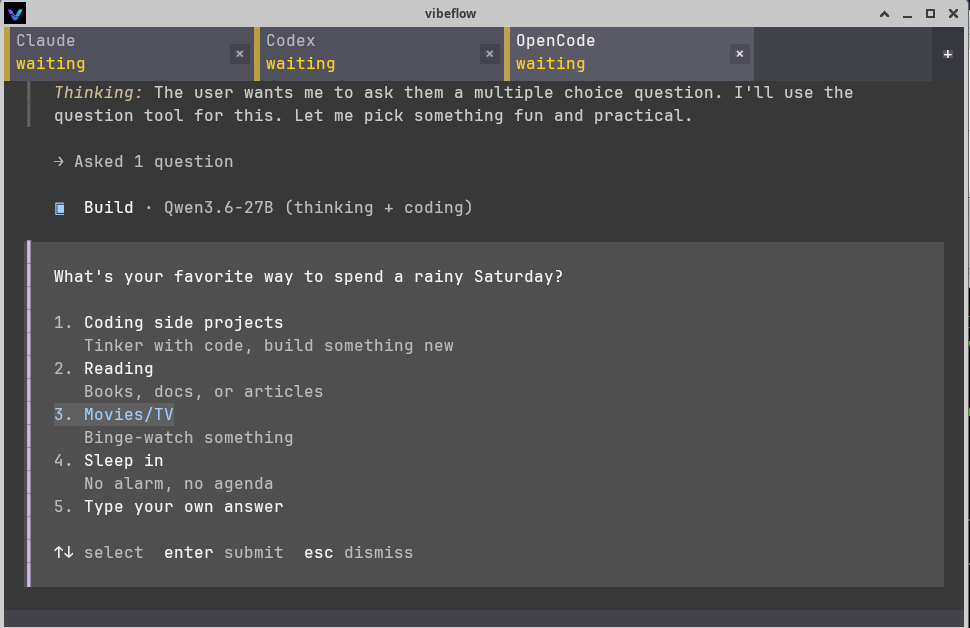
vibeflow in use: Codex working (blue) between Claude and OpenCode waiting (amber), with the waiting agent’s prompt visible below.
(One note: the protocol’s vocabulary is four states, but the terminal’s internal notion of a tab
adds Idle, a shell sitting at a prompt with nothing running, which only vibeflow itself assigns.
A tool can’t emit idle, because only the terminal is in a position to know it.)
What running it daily — and auditing it — surfaced
I drafted everything above against v0.1.4. In the weeks since, I’ve been running vibeflow as my
daily driver and put it through a full pre-launch audit, and a handful of problems surfaced worth
mentioning, partly because some are exactly what the “render glyphs vs. understand state” framing
predicts, and partly because the bugs were good ones. (The app is at v0.1.7 now; the
vibeflow-protocol crate is unchanged at 0.1.3.)
The pulse that flickered. The marquee feature, the pulsing amber stripe, has a caveat I didn’t
know when I wrote the rendering section: over VNC, or any software X server, it can make the whole
screen flicker, and it got worse the more I used it, which screamed memory leak. It wasn’t.
Resident memory was flat for hours; the GPU held a steady 33 MiB. The real cause is more
interesting: vibeflow has no damage tracking yet, so every repaint re-presents the entire
surface. The amber pulse is a 1.4-second sine animation, so a waiting tab repaints ~10×/second
forever, to animate a six-pixel stripe. On a real GPU that full-surface present is free and
invisible; on a software server like TigerVNC, each present is re-encoded as full-screen damage
and streamed to the client, and ten of those a second flickers. The tell was that it tracked my
GPU load, not uptime: when a local LLM was hammering the card, the VNC re-encode couldn’t keep
up and the flashing appeared; idle, the identical presents were invisible. The fix shipped as an
opt-out, [ui] indicator_pulse = false renders a steady amber stripe, while the real fix (present
only the changed rectangle) waits on damage-aware presentation the safe wgpu surface API doesn’t
currently expose. A good reminder that “re-send the whole screen to animate a stripe” is exactly
the waste you stop noticing on fast hardware.
A firehose could eat all your RAM. The thread reading a tab’s pty handed bytes to the main loop
over an unbounded channel. Pipe something relentless (cat /dev/zero, a runaway agent dumping
gigabytes) and the reader produces at hundreds of MB/s while the parser drains at ~9 MB/s; the
difference piles up as unbounded heap. A ten-second way to OOM the process, and exactly the report
a curious stranger files first. It’s now a bounded channel: the reader blocks when the queue is
full, the kernel pty buffer fills, the child’s writes block. Backpressure, the way terminals have
throttled fast producers forever, no bytes dropped. The next part was teardown: a reader blocked on
a full channel can’t be woken by killing the child, so closing a tab mid-firehose would deadlock
unless you drop the receiver before joining the thread. (There’s a regression test for that now.)
Two crashes the audit caught. Before finalizing these posts I ran the whole codebase through a
pre-launch audit: clean cargo build, over 630 tests passing, cargo clippy -D warnings,
cargo doc -D warnings, and cargo audit across all 419 crates in Cargo.lock with zero known
vulnerabilities, paired with a multi-agent review that did adversarial passes over each subsystem.
The headline was that the codebase was already in good shape, unsafe is forbidden workspace-wide
and there’s no network surface, but it found two real bugs, both local-trigger crashes:
- Drag-select to the window edge could crash the whole app. The pixel→grid coordinate conversion didn’t clamp, and a window’s pixel size is almost never an exact multiple of the cell pitch, so dragging a selection into the thin partial-cell strip on the right or bottom edge produced a grid coordinate one cell past the end, and the grid is indexed with a raw array access that panics in release. On Linux the mouse-up auto-copy to PRIMARY hits that path with no extra keystroke. Fix: clamp at the one place pixels become grid coordinates.
- Startup could panic if launched within ~an hour of boot. Two timers were initialized to “an
hour ago” with
Instant::now() - Duration::from_secs(3600).Instantsubtraction panics on underflow, and Linux’s monotonic clock is anchored at boot, so on a freshly-booted machine vibeflow crashed before the window opened. Fix: a saturating subtraction. This one was caught by a Clippy lint, not the review. A good reminder that boring tooling and a smart review catch different classes of bug.
Fuzzing the part this post is about. The streaming dispatcher that recognizes OSC 1338 across arbitrarily-split reads now has a differential fuzzer: feed the same bytes as random segments and as one chunk, and the two event streams must match. It ran a million-plus iterations clean. If you’re going to publish a post claiming your parser handles split frames correctly, it’s worth having a machine try to prove you wrong first.
The automated suite (including two 60-second fuzzers) is green, but the final gate for this project has always been a hands-on smoke test on a real display, and that’s still the rule.
Can you trust a terminal that parses hostile bytes?
A terminal’s actual job is to render bytes from arbitrary programs, including a remote host you SSH into, so its real threat model is hostile output. A few properties I can stand behind, each with the mechanism, so a skeptical reader can check it in the source.
The structural one: terminal output can never talk back. The most important property isn’t a
check, it’s an architecture. vibeflow drives the grid as Term<VoidListener>, and alacritty’s
VoidListener drops every event the VTE produces in response to terminal output: clipboard-read
requests, color queries (OSC 4/10/11), device-attribute and cursor-position reports, text-area size
requests, any program-initiated PTY write. So an entire class of classic terminal attacks (echo a
crafted query back, trick the parser into replying) is dead by construction, not by a filter that
could be bypassed. The only things that ever write to the pty are your real keystrokes, pastes, and mouse
actions — never the terminal’s own output. (OSC 52 writes go to your system clipboard, not the pty.)
OSC 52 clipboard: write-only, bounded, gateable. A clipboard read over OSC 52 is an
exfiltration vector, so it’s not implemented, intentionally, and SECURITY.md says so. Writes are
bounded before they allocate (the base64 payload is clipped to a decode-safe length before
decoding, capped at 100 KB after, and the dispatcher drops any OSC sequence over a 128 KB
envelope), and as of the audit cycle they’re opt-out ([clipboard] allow_osc52_write = false) for
anyone who’d rather untrusted output not touch their system clipboard.
Bounded everywhere an attacker controls the size. A never-terminated OSC/DCS sequence can’t exhaust memory: the buffer caps at 128 KB and then keeps scanning for the terminator while buffering nothing, even across arbitrarily many split reads. Tab titles (OSC 0/2) are sanitized before they render: C0/C1 control characters, DEL, and Unicode bidirectional-override codepoints (a tab-spoofing vector) are stripped, then length-capped. Pasting is hardened against the bracketed-paste splice attack: both the 7-bit and 8-bit (C1) paste-end markers are stripped, and the strip loops to a fixpoint so removing one marker can’t reassemble another. And the pty reader → main-loop channel is the bounded one from the firehose story above.
Fuzzed, and the supply chain is signed. Two libFuzzer targets run on every CI build: the
OSC 1338 parser, and the differential dispatcher fuzzer. unsafe is forbidden across the whole
workspace. A manual cargo audit of the dependency tree reports zero known-vulnerable dependencies
(running cargo audit / cargo deny automatically in CI is a v0.2 item). And releases are verifiable:
GitHub Actions are pinned by commit SHA, the AppImage build tool is checksum-verified before it
runs, and each release ships a CycloneDX SBOM, a SLSA build-provenance attestation, and a SHA-256
of the AppImage. There’s a private disclosure path in SECURITY.md; a byte sequence that crashes
or hangs the emulator, or anything that gets OSC 52 to read, is in scope and welcome.
Where this goes
The terminal is fun to build, but the protocol is the key piece. OSC 1338 is a small, documented, MIT/Apache-2.0 thing, and it’s far more useful if it isn’t just vibeflow’s private handshake. If you build terminals, or AI coding tools, I’d love for you to emit it, consume it, or tell me where the design is wrong. The spec and the crates are on GitHub.
I built vibeflow solo, I’m new to Rust, and a lot of it was written with Claude Code, which is either a fitting origin story for a tool aimed at agentic development or a reason to read the source skeptically. Both, probably. Either way it’s open; come look.
- Repo & protocol spec: https://github.com/bjhengen/vibeflow
cargo install vibeflow, or the AppImage on the releases page.