I spent a weekend fine-tuning a model for my knowledge management app, designed to handle notes, PDFs, and presentations with Oracle Database 23ai’s vector search (see my management AI post). It aced testing on my RTX 5090 server, but on my M2 MacBook Pro? Barely usable. A query like “Summarize last week’s customer meetings and identify risks” took over a minute, leaving me staring at a spinning wheel while my coffee got cold.
This is the story of how I built a 3-way LLM toggle to choose between cloud APIs, local models, and self-hosted GPU models—and why flexibility is key when the “best” model isn’t always the right one.
The Problem: One Size Doesn’t Fit All
My app queries hundreds of documents—meeting notes, PDFs, spreadsheets—stored in Oracle Database 23ai, with vectors generated by OCI’s Embedding service. Initially, I used Oracle’s OCI GenAI service, which I found was fast and reliable. But my fine-tuned model, trained on years of management notes, understood my context better.
The challenge? Balancing:
- Security: Keep sensitive data on-device
- Power: Get tailored, high-quality answers
- Speed: Avoid minute-long waits
No single LLM deployment could deliver everything. So I built a system to switch between three options, adapting to my needs—whether offline on a plane or needing instant answers in the office.
The Contenders
Option 1: OCI GenAI (Cloud)
- Model: Cohere Command R+ (via Oracle Cloud)
- Location: us-chicago-1 region
- Context: 80K tokens
Option 2: Fine-tuned Granite on M2 Mac (Local)
- Model: IBM Granite 4.0 H Micro (3B params, fine-tuned)
- Location: MacBook Pro M2 Max (64GB RAM)
- Context: 1.5K tokens (limited by buffer bug)
Option 3: Granite on RTX 5090 (Self-hosted)
- Model: Granite 4.0 H Tiny (1-2B params)
- Location: Ubuntu server with RTX 5090
- Context: 8K tokens
- Note: In my testing, I found that this smaller model may hallucinate on details (e.g., customer names)
The Performance Reality Check
Tokens are small units of text—like words, punctuation, or spaces—that an AI model processes to understand and generate responses. In my app, a query like “Summarize last week’s customer meetings” might use 10-20 tokens, while the context (e.g., summarizing a large presentation or pdf) could use thousands.
Larger context windows (e.g., 80K tokens) allow richer answers, while higher tokens/sec means faster processing. I tested a typical query: “Summarize last week’s customer meetings and identify risks.”
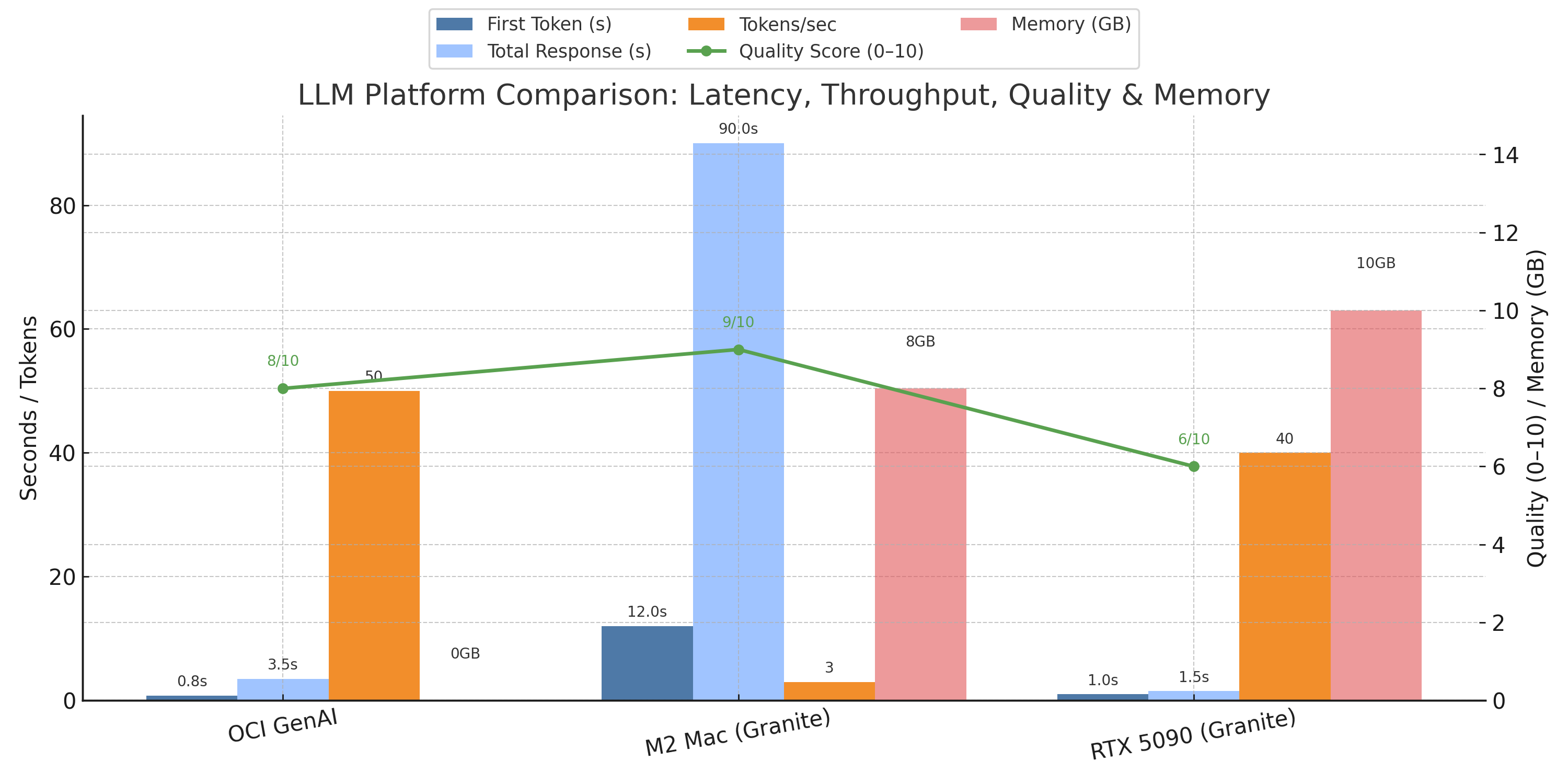
Caption: Comparing response time, processing speed (tokens/sec), and my determination of answer quality (scored 1-10) across cloud, local, and GPU-based LLMs.
The fine-tuned Granite on my M2 Mac gave the best answers (9/10), capturing my management style, but was painfully slow (60-120s), even with Oracle Database 23ai’s vector search. The RTX 5090 with Granite H Tiny was fast (1-2s) but less accurate (6/10), sometimes mixing up names. OCI GenAI balanced speed (3.5s) and quality (8/10) - proving the best overall for my use case.
Why Was the M2 Mac So Slow?
The Granite model’s Mamba2 architecture is efficient for training but struggled on my M2 Mac:
- No GPU acceleration: Runs on CPU, despite Apple Silicon’s MPS
- Memory bandwidth: 400GB/s vs. RTX 5090’s 1TB/s
- Quantization overhead: 4-bit quantization slows compute
- Framework overhead: llama.cpp isn’t optimized for Mamba2
- Buffer bug:
api_server.pyrequests excessive RAM (18-104GB) for prompts >1.5K, limiting context to 1.5K tokens, reducing 23ai’s vector search effectiveness
# Expected
inference_time = model_size / compute_power
# 3B params / Apple Neural Engine = fast!

# Actual
inference_time = (model_size * architecture_penalty * quantization_overhead) / cpu_cores
# Result: 15x slower
Building the 3-Way Toggle
I built a provider system to switch LLMs, integrated with Oracle Database 23ai for data and vector storage. Here’s the implementation:
Backend Architecture (Node.js)
// services/llmProviderManager.js
class LLMProviderManager {
  constructor() {
    this.providers = {
      oci: new OCIProvider(),
      local: new LocalGraniteProvider(),
      gpu: new GPUGraniteProvider()
    };
    this.defaultProvider = 'oci';
  }

  async askQuestion(question, context, provider = null) {
    const selectedProvider = provider || this.defaultProvider;
    const startTime = Date.now();
    const memBefore = process.memoryUsage();

    try {
      const response = await this.providers[selectedProvider].generate({
        prompt: this.buildPrompt(question, context),
        maxTokens: selectedProvider === 'local' ? 300 : 1000, // Adjusted for 23ai vector context
        temperature: 0.7
      });

      await this.logMetrics({
        provider: selectedProvider,
        responseTime: Date.now() - startTime,
        tokensGenerated: response.tokenCount,
        memoryUsed: process.memoryUsage().heapUsed - memBefore.heapUsed
      });

      return response;
    } catch (error) {
      if (selectedProvider !== this.defaultProvider) {
        console.log(`Provider ${selectedProvider} failed, falling back to OCI`);
        return this.askQuestion(question, context, this.defaultProvider);
      }
      throw error;
    }
  }
}
Provider Implementations
// providers/ociProvider.js
class OCIProvider {
  async generate({ prompt, maxTokens }) {
    const token = this.getOCIToken();
    const response = await axios.post(
      'https://genai.us-chicago-1.oci.oraclecloud.com/v1/chat',
      {
        model: 'cohere.command-r-plus',
        messages: [{ role: 'user', content: prompt }],
        max_tokens: maxTokens
      },
      {
        headers: {
          'Authorization': 'Bearer ' + token,
          'Content-Type': 'application/json'
        }
      }
    );
    return {
      text: response.data.choices[0].message.content,
      tokenCount: response.data.usage.completion_tokens,
      provider: 'oci'
    };
  }
}

// providers/localGraniteProvider.js
class LocalGraniteProvider {
  async generate({ prompt, maxTokens }) {
    const response = await axios.post('http://localhost:11434/api/generate', {
      model: 'granite-manager:3b',
      prompt: prompt,
      stream: false,
      options: {
        num_predict: maxTokens,
        temperature: 0.7
      }
    });
    return {
      text: response.data.response,
      tokenCount: response.data.eval_count,
      provider: 'local'
    };
  }
}

// providers/gpuGraniteProvider.js
class GPUGraniteProvider {
  async generate({ prompt, maxTokens }) {
    const response = await axios.post('http://gpu-server:8000/v1/chat/completions', {
      model: 'granite-4.0-h-tiny',
      messages: [{ role: 'user', content: prompt }],
      max_tokens: maxTokens,
      temperature: 0.7
    });
    return {
      text: response.data.choices[0].message.content,
      tokenCount: response.data.usage.completion_tokens,
      provider: 'gpu'
    };
  }
}
Addressing the Challenges
The 3-way toggle directly tackled my challenges:
- Security: Local M2 Mac deployment keeps sensitive data on-device, ideal for confidential notes.
- Power: Fine-tuned Granite on M2 delivers tailored answers (9/10 quality), outperforming generic LLMs - but with a big cost in performance.
- Speed: OCI GenAI (3.5s) and RTX 5090 (1-2s) provide fast responses, while M2’s slowness (60-120s) is offset by planned RAG integration with Oracle Database 23ai to reduce context size.
Lessons Learned
Data Quality Over Hardware
The M2 Mac’s slowness was worsened by a buffer bug in api_server.py, limiting context to 1.5K tokens and reducing Oracle Database 23ai’s vector search effectiveness. Quality data from fine-tuning (see management AI post) was key, but required patience.
Flexibility Is Key
The toggle integrates with Oracle Database 23ai’s vector search, letting me choose OCI for speed, local for increased privacy, or GPU for balance.
The Verdict: Right Tool for the Right Job
There’s no “best” LLM deployment—only the best for your context. My thoughts, after comparison:
- Cloud (OCI): Fast (3.5s), reliable, ideal for most 23ai queries
- Local (M2): Perfect for privacy and tailored answers, but needs a beefier laptop
- Self-hosted (RTX 5090): Fast (1-2s), private, but less accurate (6/10)
Key insight: Flexibility lets me adapt—OCI for speed, local for increased privacy, GPU for balance.
What’s Next?
- Self-hosted Fine Tuning: Test a larger self-hosted model with fine tuning
- ONNX embeddings in Oracle Database 23ai: Embed data in 23ai for faster queries
- Multimedia support: Improve image/PDF understanding (uses OCR today)
The future is orchestrating LLMs, balancing general-purpose and specialized models with Oracle Database 23ai’s vector search.
Implementation Checklist
To build something similar:
- Set up provider abstraction layer
- Implement health checks
- Add metrics logging
- Build provider selection UI
- Create fallback logic
- Set up monitoring and alerts
- Document expected response times
- Test offline scenarios
Have you integrated LLMs with Oracle Database 23ai? What trade-offs have you faced? Comment or reach out! See my other posts (https://brianhengen.us/posts/) for more on specialized models.
About the Author
Brian Hengen is a Vice President at Oracle, leading technical sales engineering teams. The views and opinions expressed in this blog are his own and do not necessarily reflect those of Oracle.